
AI probably hasn’t given you your week back yet. You open a chat, ask a question, get a solid answer, then copy it, fix it, send it, and do the rest yourself. A few minutes saved, and the week looks the same. In my newest video I show the shift that actually returns hours: stop asking questions, start handing over jobs.
Listen for the word every
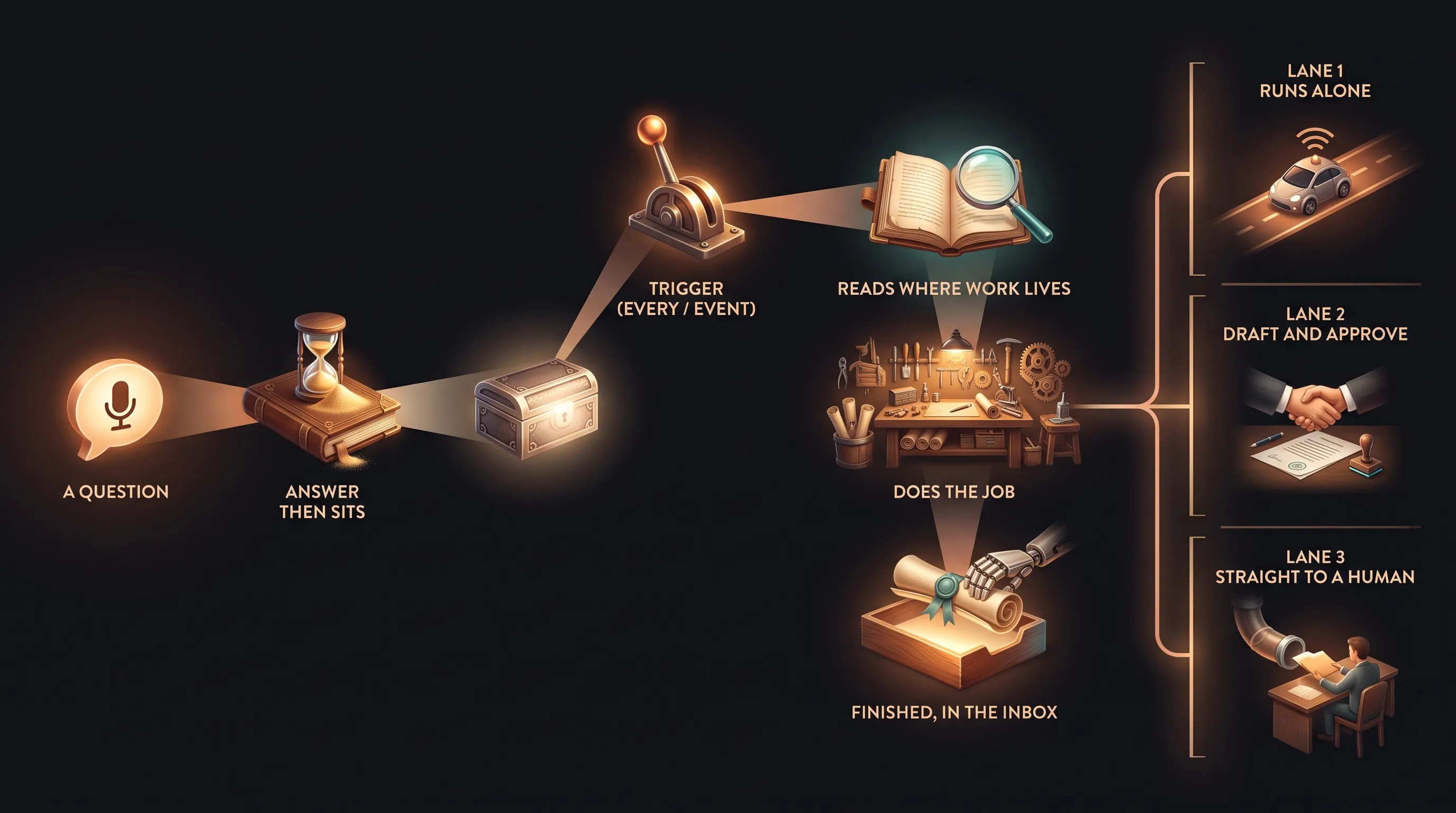
A question gets you an answer. A job has a start, a finish, and a place the result lands. “Write a renewal reminder for the Ortiz account” is a question, useful once. “Every Monday, find the policies renewing in ninety days, draft a check-in for each, and give the account manager the list” is a job. The quick test: if someone has to come back tomorrow and ask again, it was a question.
So where do you find jobs? Listen for one word, every. Every Monday, every new client, every time someone asks for a certificate. At your next team meeting, ask what people do the same way every time, and write down each answer that has the word every in it. The list fills up fast.
If AI has felt like one more thing to manage rather than a help, you are not imagining it. Upwork found that 77 percent of workers who use it say it has actually added to their workload. Jobs are how you flip that number, because a job takes work off your plate instead of handing you a faster way to do it yourself.
Finished means it’s already where it’s used
An AI employee can’t do work it can’t see. If you are copying things into a chat and pasting answers back out, you are the delivery person, and that is exactly the time you were trying to win back. So connect it to where the job starts and where the result goes, with read access first, so it can find, sort, and draft without changing anything.
Then change what finished means. A result sitting in a chat still needs someone to move it. Finished looks like a draft already in the account manager’s inbox, the renewal date and current coverage filled in, plus a new row on the renewal sheet marked drafted. Nobody re-types anything. They open it and decide. Show it a few real examples you were happy with, and use the format your team already works in, so nobody has to learn a new screen to use its work.
Three lanes, and let it earn freedom
Take yourself out of the start with a trigger: a schedule, like every Monday at seven, or an event, like a certificate request landing in the inbox. Then sort each task by one question, if this went out wrong, what would it cost to fix. Lane one runs on its own, simple and proven, where nothing is promised. Lane two drafts and waits for a person, anything with a figure, a coverage question, or a commitment. Lane three goes straight to a human, the upset client, the disputed claim. The subtle part is that the lane belongs to the task, not the whole job. One job can touch all three.
And nothing starts in lane one. Like a new hire, every task earns it. A person approves each draft, and only after two straight weeks where you changed nothing does a task move up. If you are still fixing the same thing every week, don’t move it, fix the example and start the clock again. That is the patient version of starting with one job, and it is how AI finally saves you a day a week instead of a few minutes. If you want to know which jobs in your business could run on their own and what to connect first, that is what a free assessment is for.